

What’s on the form
Each employer sets up its own form, so forms can look different from job to job. A form can include:- Your details, like your name, email, phone number, date of birth and address
- Messaging Consent, where you choose whether the employer can send you texts or WhatsApp messages
- Your resume. See Upload your resume.
- Education History and Work History
- LinkedIn Profile URL, a link to your LinkedIn profile
- Questions from the employer, for this job
- Consent forms to sign. See Sign consent forms.
- Voluntary Self-Identification questions
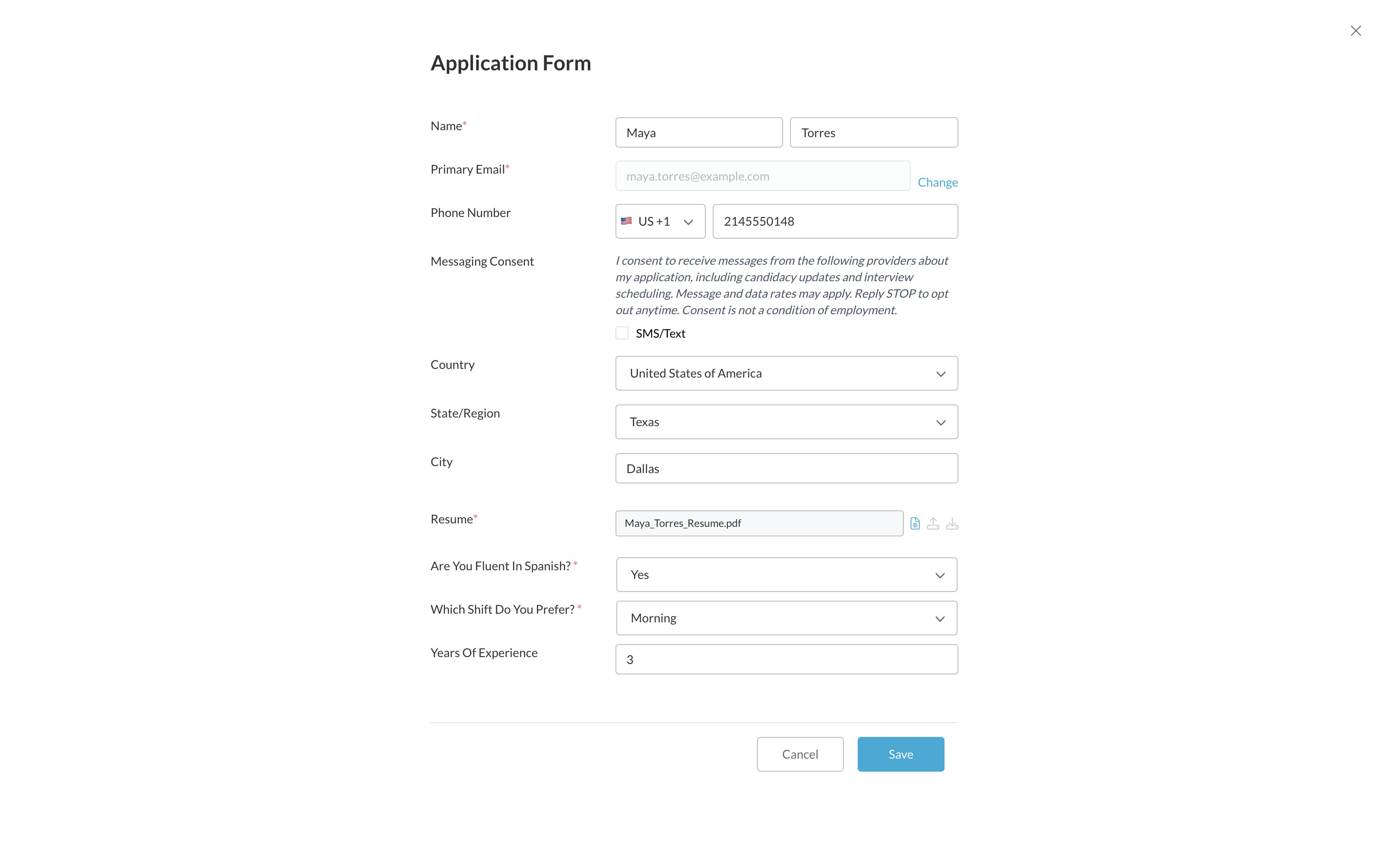
Fill in the form
1
Fill in the required fields
Fields marked with a red * are required.
2
Add your resume, if asked
If you have a resume and the Education History or Work History section is empty, it may fill in from your resume. You’ll see We filled this in from your resume. Please review and edit as needed. Check it and fix anything that’s wrong.
3
Click Save
Save stays grey until every required field is filled in and you’ve changed at least one thing.
Your form and your profile
You have one profile, and the form shows your profile details. See Update your profile.- Your details and resume are the same for every job. If you change them on this form or in My Profile, they change everywhere.
- Education and work history is kept separately for each employer.
- Answers to the employer’s own questions stay with that employer. Some are saved just for this job.
Related
Stuck or can't continue?
When Save won’t turn on.
Update your profile
Change your information.